Please note
For the purposes of this tutorial, we will be using Microsoft syntax, terms, images, etc.
Prerequisties
-
We'll need data to follow this tutorial. I could use pre-existing system data but that could make things confusing.
Instead, I've created a simple script that can be applied quickly and easily to get us started.
Click here to download a copy of the script that can be used to populate data for this tutorial.
Click here to open our tutorial on how to load this data to a database.
Before we begin
The SELECT statement is the most common and most important topic of the SQL language. It is used to retrieve data for purposes that range from basic data review to complex data analysis. A basic SELECT statement consists of a few components:
-
- A SELECT clause.
- A FROM clause.
- A WHERE clause (optional).
Example:

Let's get started
- You should receive a result set containing 10 records - all records from the table.
- The SELECT clause tells SQL Server that our intention is to retrieve data.
- The asterisk ("*") is a wildcard character. It tells SQL Server to return all columns.
- The FROM clause tells SQL Server what column to search to look for the value.
- And the semi-colon (";") at the end of the query informs SQL Server about where the query is intended to end.
- Note that this query, and many others in the future, will run just fine without a semi-colon. I will be using semi-colons throughout my SQL tutorials because it is a good practice and it will help mitigate problems in the future.
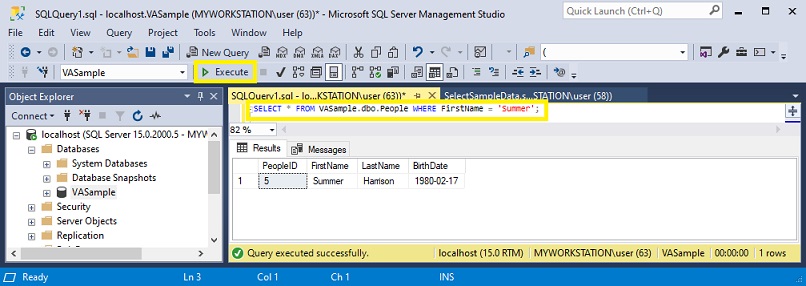
- The WHERE clause tells SQL Server how to filter the data.
- In this case, "=" means equal to.
- This allows us to limit the data set so that it only includes records containing "Summer" in the 'FirstName' column.
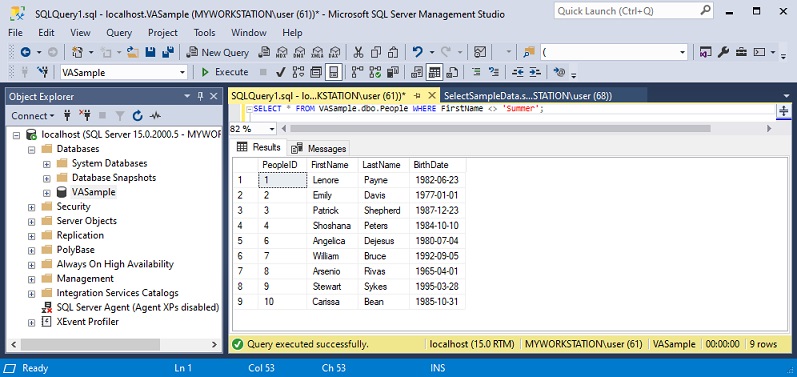
- "<>" means not equal to.
- This allows us to omit the record that contains "Summer" in the 'FirstName' column.
- Notice that only 9 out of 10 records returned.
- PeopleID 5 is missing, which is the record where 'FirstName' is nto equal to "Summer".
If you need help with opening the SSMS application, please click here to navigate to our tutorial on how to accomplish this.
Let's begin by typing the following query into a clean query window:SELECT * FROM VASample.dbo.People;Press the 'Execute' button to run the query.

What if we want to narrow down our search so that we only return data that pertains to "Summer"?
Let's try adding a WHERE clause and see what we get.
SELECT * FROM VASample.dbo.People WHERE FirstName = 'Summer';You should receive 1 record containing the string value "Summer" in the column named 'FirstName'.
Similarly, we can restrict the results to exclude "Summer"? Let's try adjusting the WHERE clause.
Copy and past the following query, then click 'Execute'.
SELECT * FROM VASample.dbo.People WHERE FirstName <> 'Summer';You should receive 9 records.
This concludes our tutorial on the basic SQL statement. Please reach out to us if you encountered any issues or if you have feedback or suggestions that you would like to send our way.